Showing posts with label HOT TIPS. Show all posts

Tuesday, 5 November 2013

Hack a Computer Password

How to Hack a Computer Password

Here we can change our computer password without using old password of system.

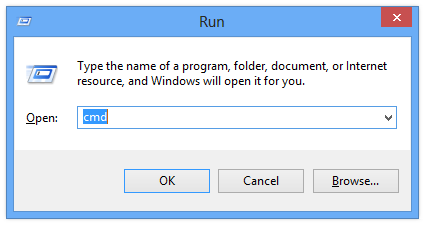
  1. First open run and type cmd
  2. Open command prompt
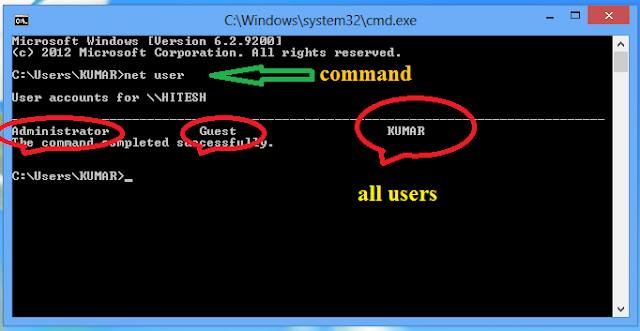
  3. Type “net user” on command prompt.
  4. Here show all users of computer.
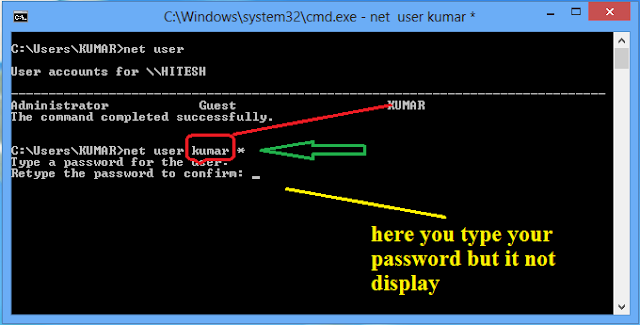
  5. Type “net user user_name * ” on command prompt.
  6. Now you type your own password
  7. Again type same password.

cmd


net user


change user password


now your computer password is changed without asking old password.

Trace an IP Address to a Location

Trace an IP Address To A Location

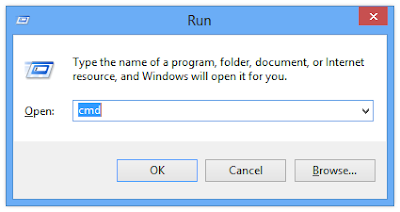
  1. First open run and type cmd
  2. Open command prompt
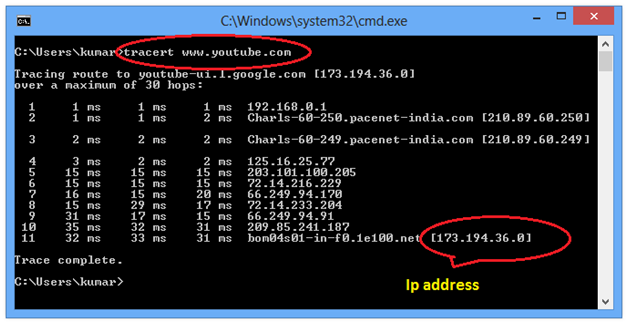
  3. Type “tracert site address” on command prompt
  4. Here last line is show IP address of that location


    cmd 


    trace IP address

    Share Files between two PCs using LAN


    How to Share Files between two Computers using LAN


    When we want to transfer a large amount of data from one computer to other computer its take more time and we also need a large memory pendrive. Using lan we can transfer a large amount of data from one computer to other computer,

    1. Connect both computer with LAN cable.
    2. Open my computer and right click on any derive, from which derive you want to transfer data.
    3. Click on share with
    4. Click on Advanced Sharing

    NOTE: If you use wi-fi router then no need to connect computer through LAN wire

    My computer window


    File share window


    Share folder dialog box


    Share folder permission dialog box


    click ok ----> ok ---------> close.

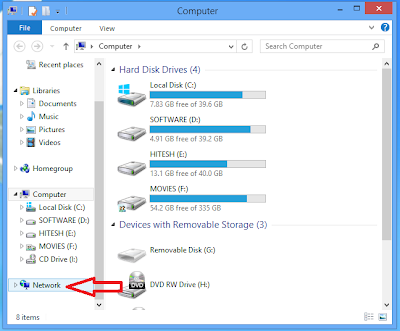
    5. Now open another computer and go to network and click on this.

    Network window


    Shared System

    After this fill the password of shared computer and you get the data from shared computer and paste it on your own computer

    Monday, 4 November 2013

    Run C / C++ in Full screen on Window 7 or 8

    How to Run C and C++ in Full screen on Window 7 or 8


    After releasing window 7 a big problem for c or cpp programer to run c os cpp program in full screen or full window. Here i am going to discus how to  Run c and c++ in full screen on window 7 or 8 operating system.

    Its is simple first you download given TC files and install in your computer


    how to download file

    Saturday, 2 November 2013

    Use dosBox for C or C++

    Open DosBox and type

    z:\> mount c c:/

    Then Type

    z:\> c:

    how to use dosbox

    Now we are on c:\>

    c:\> cd TC --------- to change directory

    c:\> cd bin -------- to change directory

    c:\TC\bin>TC -------- open turbo C

    In dosbox for C and C++

    Exit -- alt + f9

    Compile and run the program clt +f9

    Sunday, 1 September 2013

    Remote Desktop

    Remote Desktop is a great feature of window operating system, using this feature we can see other computer desktop on my own computer desktop. To do this process we must follow following steps.

    •  Right click on my Computer and select properties.

    mycomputer properties


    • Choose Remote Setting.


    remote setting


    •  Now allow Remote connection to this computer. 
    remote window  

    •  Now you need a IP address of other computer. follow these steps for find IP address of any system.
    • first open Run window and type "cmd".
    • now your command prompt are appears.

      
    • On command prompt type "ipconfig". this ip address is other system ip address not your own system IP address.

    cmd window


    • Now open remote desktop window from your computer. Go to search box and type "remote desktop". if you have window 7 or window xp then first go to 
    • start button ---> All programs ------> accessories  -----> go on remote desktop


    window xp


    • Fill IP address of other system which you want to connect with your own system.


    remote desktop connection dialog box


    This is a simple and easy way to connect two computer with each other without using any software.

    In these day a lot of software is available in market to connect two computers.
    • Using VNC
    • Using team viewer

    Using VNC

    • This is very easy to use first of all you download a VNC software and install in your computer.
    • Next get IP address of other system and fill on VNC. 
    • Here you need to install VNC in both system in your own system and in other system which you want to connect.
    • now your computer is ready for connection.
    vnc dialogbox


    Using Team Viewer


    • This is also a very easy way to connect a system to other system, This is very popular in these day.
    • First of all download and install team viewer in your system.
    • Here after instalation team viewer generate a ID and Password.
    • You need to install team viewer in both system.
    • Finally you get the partner system ID and Password and fill on your own system
    • Now your system is ready to connect with other system.   
    team viewer window